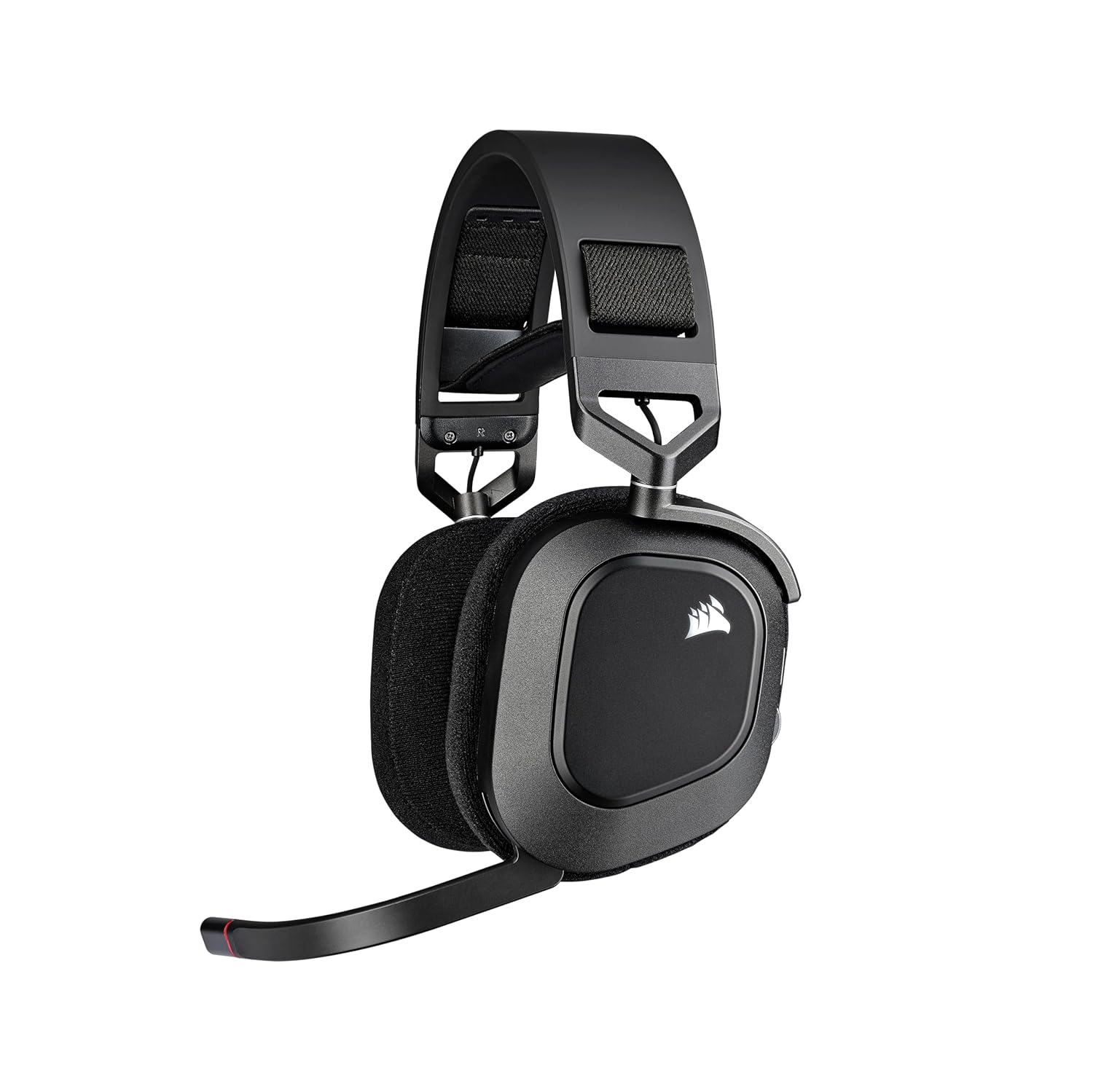
Corsair HS80 RGB WIRELESS
The CORSAIR HS80 RGB WIRELESS Gaming Headset connects with hyper-fast SLIPSTREAM WIRELESS, delivering incredibly detailed 24-bit sound.
- Wireless
- 50mm Dynamic Drivers
- Fixed Boom Mic
- 367g
*Affiliate Link: We may earn a commission from qualifying purchases.
Community Evaluation
Performance Tiers
Community consensus based on aggregated review data.
Fit Recommendation
Optimized for ergonomic comfort over long sessions.
Based on long-term clamping force, headband expansion, and cup depth volume.
Review Consensus
Aggregated from 1200+ verified sources.
Technical Specifications
Audio
Connectivity
Microphone
Build & Features
Overview
The CORSAIR HS80 RGB WIRELESS is a premium gaming headset that bridges the gap between traditional gaming gear and high-fidelity audio equipment. Featuring custom-tuned 50mm high-density neodymium drivers with an expanded frequency range of 20Hz-40kHz, it delivers exceptional detail in every sound. Its standout feature is support for Dolby Atmos on PC, which provides immersive spatial audio that creates a true 3D soundscape.
Beyond its audio capabilities, the HS80 is frequently cited as one of the most comfortable headsets on the market thanks to its floating “ski-goggle” style headband and plush cloth-covered memory foam earpads. The broadcast-grade omnidirectional microphone sets a high bar for wireless communication, offering clarity that rivals some standalone desktop mics.
Key Features
SLIPSTREAM WIRELESS Technology: Connect with hyper-fast, low-latency audio using SLIPSTREAM WIRELESS, or use a wired USB connection for high-fidelity 24-bit/96kHz sound.
Dolby Atmos Spatial Audio: On PC, experience incredible spatial accuracy that allows you to hear sounds in three dimensions, giving you a competitive edge in FPS games.
Broadcast-Grade Microphone: The omnidirectional microphone captures your voice with professional-level clarity and features a flip-up mute function with a built-in LED indicator.
Immersive Comfort: The stress-free floating headband design and breathable fabric earpads ensure long-lasting comfort for even the most intense gaming marathons.
Dynamic RGB Lighting: Customize your look with nearly limitless color options and effects via CORSAIR iCUE software.
Audio Quality
The HS80 RGB WIRELESS offers a refined and detailed audio experience. The high-density neodymium drivers provide a wide frequency response, allowing for tight, controlled bass and crisp highs. When utilized with Dolby Atmos, the positional accuracy is top-tier, making it easy to track footsteps and reloads in competitive shooters.
For music and media, the HS80 delivers a rich sound profile. While the default tuning is well-balanced, the iCUE software provides a 10-band equalizer for those who want to fine-tune the high and low end to their liking. The wired USB mode further enhances the detail with support for 24-bit/96kHz audio.
Comfort & Build
The build quality of the HS80 is exceptionally high, featuring aluminum reinforced hinges and high-quality plastics that feel premium to the touch. The floating headband design is a highlight, as it distributes weight evenly across the head, preventing the “hot spots” often associated with traditional headbands.
The fabric earpads are another major plus, offering better breathability than leatherette alternatives, which helps prevent heat buildup during long sessions. While the battery life is rated at up to 20 hours (and often less with RGB active), the comfort and build quality make it one of the easiest headsets to wear daily.
Verdict
The CORSAIR HS80 RGB WIRELESS is a fantastic choice for gamers who want a premium experience without jumping into the $200+ price bracket. Its combination of top-tier microphone quality, incredible comfort, and detailed spatial audio makes it a standout performer.
While the battery life is shorter than some of its competitors, the trade-off for its superior comfort and audio fidelity is well worth it for many users. If you value clear communication and a stress-free fit, the HS80 should be at the top of your list.
Frequently Asked Questions
Based on community census data and common user queries, these are the most frequently discussed topics for this headset.
How do I adjust the 'ski-goggle' headband for a smaller head?
The HS80 uses velcro straps hidden under the plastic side plates to adjust tension. If the headset feels loose or sits too low on your ears, peel back the velcro on the inner band and pull it tighter. It can take a few tries to get the balance right, but it's the only way to shorten the suspension bridge.
Does Dolby Atmos work on PlayStation 5?
No. The Dolby Atmos license included with the HS80 is exclusive to Windows 10/11. On PS5, you should use the console's built-in 'Tempest 3D Audio' system through the USB dongle. It provides a similar spatial effect tailored for Sony's hardware, but you won't use the Dolby Access app.
Why is the microphone so sensitive to breathing sounds?
The HS80's mic is 'broadcast quality,' meaning it captures a much wider frequency range than standard mics. If your friends hear you breathing, use the included foam windscreen and position the mic tip at the corner of your mouth rather than directly in front of it. You can also increase the 'Noise Gate' threshold in iCUE.
Can I use the HS80 while it's charging?
Yes. The HS80 supports 'Play and Charge.' However, when plugged in via USB, it will default to a wired audio mode (supporting 24-bit/96kHz). If you want to keep using the wireless dongle while charging from a wall outlet, ensure you haven't switched the PC default playback device to the USB cable.
How do I fix the 'iCUE not detecting headset' bug?
This often happens if you have other RGB software (like Aura Sync or Mystic Light) running. Close all other controllers, then unplug the dongle AND the USB-C cable from the headset. Restart iCUE, plug in the dongle first, and wait 10 seconds for the handshake to complete before plugging in the charging cable.
Support & Resources
More from Corsair
Discover other headsets in their lineup